
BinnX1 For Day-to-Day IT Problems, Computer Hacks, Music Related Inquiry, Tips & Tricks, Gadgets, Operating Systems, Guitars, Music Instruments, Metal Theory, System Softwares.. Mods and lot more.....
Wednesday, July 28, 2010


Sunday, April 25, 2010
 The Dell Lightning slider is apparently not coming out until the end of the year, but it looks rather good—aesthetically and feature-wise. The Windows Phone 7 device has a 1GHz Snapdragon processor, a 4.1-inch OLED display, and more:

Seems like this will be worth keeping an eye on.
BinnX1
Wednesday, March 31, 2010
4 Things You Never Knew Your Mobile Phone Could Do
There are a few things that can be done in times of grave emergencies. Your mobile phone can actually be a life saver or an emergency tool for survival. Check out the things that you can do with it:
1. Emergency
The Emergency Number worldwide for Mobile is 112. If you find yourself out of the coverage area of your mobile; network and there is an emergency, dial 112 and the mobile will search any existing network to establish the emergency number for you, and interestingly this number 112 can be dialed even if the keypad is locked. Try it out.
Also in Australia , the Australian emergency number 000 can be dialled whilst your mobile phone keyboard is locked. This is another reason why 000 receives so many false emergency calls!
2. Have you locked your keys in the car?
Does your car have remote keyless entry? This may come in handy someday. Good reason to own a cell phone: If you lock your keys in the car and the spare keys are at home, call someone at home on their mobile phone from your cell phone.
Hold your cell phone about a foot from your car door and have the person at your home press the unlock button, holding it near the mobile phone on their end. Your car will unlock. Saves someone from having to drive your keys to you. Distance is no object. You could be hundreds of miles away, and if you can reach someone who has the other "remote" for your car, you can unlock the doors (or the trunk).
Editors Note: It works fine! We tried it out and it unlocked our car over a mobile phone!"
3. Hidden Battery Power
Imagine your mobile battery is very low. To activate, press the keys *3370# Your mobile will restart with this reserve and the instrument will show a 50% increase in battery. This reserve will get charged when you charge your mobile next time.
4. How to disable a STOLEN mobile phone?
To check your Mobile phone's serial number, key in the following digits on your phone!:
star-hash-zero-six-hash
* # 0 6 #
A 15 digit code will appear on the screen. This number is unique to your handset. Write it down and keep it somewhere safe. When your phone get stolen, you can phone your service provider and give them this code. They will then be able to block your handset so even if the thief changes the SIM card, your phone will be totally useless. You probably won't get your phone back, but at least you know that whoever stole it can't use/sell it either. If everybody does this, there would be no point in people stealing mobile phones.
Not only the above, but also in Australia your stolen phone is added to a "Stolen Mobile Phone" database, so if your phone is found later on it can be returned to you.
X1
Monday, March 29, 2010
Personal Soundtrack T-Shirt

I know, the title is a little mundane; it was either that or ‘how to torture others with your terrible taste in music’ but that wasn’t very product-descriptive. Not only can you use this shirt, complete with
embedded speaker and pocket-remote, as an attempt to turn yourself into
Jack Spade from ‘I’m Gonna Get You, Sucka!’ but you can also use their
pre-loaded sound-effects to pepper your work-day with fart noises and
boing-boings. It’s all your choice. Only $30 and 4AAA batteries and
you’re off to the very annoying races.
X1
Sprint details HTC EVO 4G mobile phone
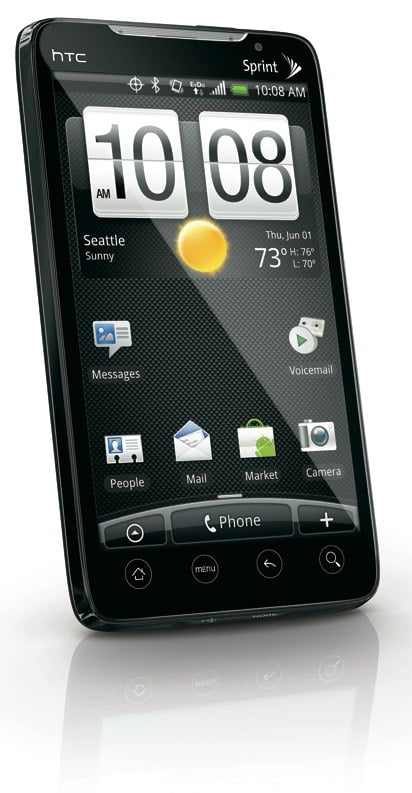
Over at CTIA, Sprint just dropped the big announcement that we knew was coming, they will be launching the first 4G smartphone - the HTC EVO 4G - and they will be doing it “this summer.” The EVO 4G runs Android 2.1, and has a gorgeous 480x800 4.3-inch TFT LCD display and is powered by a 1GHz Snapdragon QSD8650 processor and 512MB of RAM. Onboard memory isn’t much to write home about at 1GB, but seriously, that is the only “flaw” we can find with the initial look at this device, if you want to even call it that. I mean, it ships with an 8GB microSD card, and is upgradeable to 32GB. Still, built-in is always nice.
Wanna talk about some of the more exciting stuff? Well, we’ve got an 8 megapixel camera on the back, which can shoot 720p HD video, as well as a 1.3 megapixel front facing camera. You know, the one we’ve been waiting for on the iPhone? Expect to be able to do video chatting on the EVO 4G. Also, expect to be able to view the content stored on it on a larger display, since this thing rocks HDMI out. 802.11b/g Wi-Fi support and an 8GB microSD card round things out, so as you can see, this thing is packed. Oh, and let’s not forget that whole 4G thing.
The HTC EVO 4G will be the first device outside of AT&T that will allow for both voice and data to be used at the same time, thanks to the phone running both EV-DO Rev. A and WiMAX alongside a CDMA antenna. Even cooler, in our opinion, is that this device acts similar to a MiFi or Overdrive device, where it becomes a mobile hotspot that allows you to share your 4G connection with your other devices wirelessly. However, rather than being limited to five connections, the EVO 4G can give that good 4G Internet lovin’ to 8 devices at once.
Sprint knows that those picking up a 4G device are going to expect a lot more from their connection their phones that are stuck on 3G, and they demo’d a few scenarios to show that they are serious. You can stream high definition content to and from the device, take pictures and stream them anywhere, get instant and live search results with Google Goggles, and much more.
Despite the torrent of info that Sprint provided as it pertained to the HTC EVO 4G, they did neglect to provide a solid release date, as well as the price of both the EVO 4G itself, or the associated 4G data plan.

X1
3D Integrated circuits
The semiconductor industry is struggling to maintain its momentum down the path of Moore’s Law, and it is becoming clear that in addition to scaling line widths and chip sizes downward, some form of 3D IC integration will be necessary to achieve the interconnection density, manufacturing yields and cost targets. By vertically stacking and interconnecting semiconductor layers (3D integration), as opposed to continuing to shrink line widths, chip designers have the potential to get around the limitations of geometric scaling; enable a significant increase in performance and reduction in power consumption through reduced signal paths; and achieve true cost reduction through the use of proven fabrication techniques that will increase yields.
The crucial processing technology elements for 3D IC integration include: 1) through silicon via (TSV) formation; 2) wafer thinning; and 3) scalable wafer-level bonding technologies with 3D interconnect for W2W (wafer-to-wafer) or D2W (die-to-wafer) fabrication processes. The semiconductor manufacturers who adopt the optimum combination of these technologies will be the ones who lead the industry to the next level of higher device performance and lower fabrication costs.
Even as device physicists continue to debate whether the physical limits of 2D scaling will be reached at the 22-nm node or somewhere beyond, the rest of the industry is recognizing the increasing practical and financial constraints being imposed by each new milestone on the technology roadmap.
Eye-Fi X2 cards bring 802.11n, Class-6 speeds
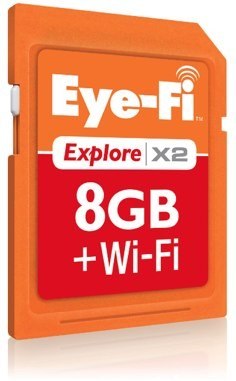
The newly released Eye-Fi X2 series of Wi-Fi-enabled SD cards is now shipping, and they offer some very nice improvements over the previous Eye-Fi models. If you are unfamiliar, Eye-Fi cards connect to your home network or a hotspot, and upload the images from your camera to your home computer so that you don’t have to physically sync your camera regularly. We have all the specs below, but we have to say, we are loving the “Endless Memory” feature the most. Basically, as you snap pics and they sync to your computer (Eye-Fi can also send them directly to social networks like Flickr and Facebook,) Eye-Fi will delete them from the card, so you never ever have to manually delete pictures.
Here’s what you can expect from the three new cards:
- Eye-Fi Connect X2 – At 4GB capacity, the Eye-Fi Connect X2 will automatically upload JPEG photos and videos to the computer and one of more than 25 online sharing sites, such as Flickr, Facebook, YouTube or Picasa, through a Wi-Fi network. MSRP: $49.99.
- Eye-Fi Explore X2 – At 8GB of capacity, the Eye-Fi Explore X2 will automatically upload JPEG photos and videos to the computer and one of more than 25 online sharing sites. It offers lifetime automatic geotagging so photos and videos arrive at the user’s computer with location information already included to identify where the image was captured. Explore X2 also offers one year of hotspot access for uploading away from home at more 21,000 AT&T and Harborlink locations across the Unites States and through open hotspots. MSRP: $99.99.
- Eye-Fi Pro X2 – Unveiled at CES and winner of CNET’s “Best of CES” award, the 8GB Eye-Fi Pro X2 will automatically upload JPEG and RAW photos and videos to the home computer, and will send them to one of more than 25 online sharing sites. It also allows users to create an ad hoc connection directly to their computer to wirelessly upload photos and videos while away from a wireless router. Like Explore X2, Pro X2 offers lifetime geotagging and one-year of hotspot access to enable uploads away from home at more than 21,000 AT&T and Harborlink hotspots and open hotspots. MSRP: $149.99.
In addition to all that, Eye-Fi cards now have double the hotspot access that they had previously, starting on March 31, with the inclusion of any AT&T or Harborlink hotspot location (like Starbucks, Hertz Rental, Marriot hotels, and more) allowing users to simply turn their cameras on, and have the Eye-Fi go to work and do its thing.
We’ve got a video demo for you after the jump.
Saturday, March 20, 2010
The Power of Post Processing used in Commercial World
So you got a new camera, clicked some pictures but they are not so vibrant or not upto the mark as you were expecting or the second choice is that you wanna see the other side of digital photography. Check out my two images posted below, got 3 awards from flickr, picasa and from the photography blog.


My aim of writing this blog entry is only because so many people asked be..... Hey!!! How you did this... When I said It takes me around 30-minutes for a single shot from click, to post process... they said WOW!!!!
Now as I am an hobbyist photographer, I like to share my views on some post processing softwares, and what type of results you can expect/get. You can get very nice results after just a light retouching.
As I use a combo - LightRoom + PhotoShop...... These are the two post processing tools in who any of the commercial is created in these.. Lightroom is used to manage files and Photoshop to edit... This combo is damn costly so it is used mostly by professionals.
For basic editing and retouching I recommend to use a free software: Picasa from Google.
It has a nice clean interface, try once and play around it to get nice vibrant results.
*I would like to share some tips after you click photographs:
1. When you got your JPEG files in a folder, open it in any post processing software (I recommend Photoshop for much advanced and complex editing)
2. Set Brightness and Contrast accordingly.
3. Set Exposure very carefully. i.e., you must not underexpose/overexpose your pictures.
4. Play around with Tone Curve its tricky and a complex method to get professional looking stills.
5. Set Vibrance.
6. Play around with Shadows & Highlights to normalize the values.
7. Any Hue/Tint Adjustment
8. Temperature Settings.
9. Straighten Photo
10. Remove Red Eye effect/vignette effect if there.
voila!! you got a very lovely picture after these 1 min adjustments.
and more over you get all these adjustments in a single pane in picasa like software to no need to worry much about it. as it looks complex but once used you'll fall in love with editing and every picture you click needs post processing.
I'll post a blog about the new technology called HDR soon. and how to generate your own HDR images.
Visit my blog for the stuff like: Ethical Hacking, Music Studio Equipments, Reviews of Music Instruments & Gadgets, Modding Stuff and lots more..... must visit....
http://binnx1.blogspot.com/
Best
BinnX
Thursday, January 14, 2010
The NAMM Show

While no one knows how strong the economy will be by January, one thing is certain—attending the 2010 NAMM Show, January 14-17, will get you positioned for success in the coming year! The NAMM Show is where you need to be to see the latest gear, get re-inspired, reconnected with your industry peers and take charge of your future.
The NAMM Show is the place to be seen and to see, sample and purchase the newest, most innovative gear that everyone will be asking for in the coming year! With more than 1,500 exhibit booths displaying musical instruments, lighting technologies and pro-audio, sound, and stage equipment, the NAMM Show is where you'll find everything you need to set yourself apart from the competition.

First Floor Plan

Overview From Outside

Jim Root of Slipknot

Kiss… on the Wall

Marshall World
Organiser
NAMM (International Music Products Association)
5790 Armada Drive,
92008
Tel: (760) 438-8001
Venue
Anaheim Convention Center
800 W. Katella Ave Anaheim, CA 92802 USA
Anaheim, USA
Tel: +1 (714) 765-8950
Fax: (714) 765-8965

Best
BinnX
Monday, January 4, 2010

Nokia X6 Review – the perfect mix of Smartphone & Music phone?

I didn’t think I’d be doing a Nokia X6 review this side of Christmas, but Nokia have obviously been working furiously to get their flagship music phone out in time for your Christmas stocking! Is the X6 worth putting on your Christmas list though? Well, it just might be.
The Nokia X6 is Nokia’s flagship music phone, and so comes with a huge range of features, an extremely responsive touchscreen, new user interface, and Nokia’s “Comes With Music” music download service, which lets you download unlimited tunes onto your phone.
And I do mean unlimited. A Comes With Music phone like the X6 gives you a year’s free subscription to the service, and during that year you can download as many tunes as you want from the millions available, store them on your phone or PC – and even keep them once the subscription ends.
Or, if you want to keep on using the Comes with Music service, you simply take out another subscription.
That’s a pretty good deal in its own right, particularly with the millions of tracks on offer and the 32GB of storage that the X6 has. But that’s not the half of it.
The X6 is the first in a new range of Nokia multimedia phones that effortlessly blend the best bits of high-end feature phones with the social connectivity and touchscreen goodness of the latest smartphones.
The Nokia X6 is, in other words, a cracking music phone with a glorious touchscreen interface, great social apps and high quality features such as a 5 megapixel camera.
And it’s here – now – right in time.
BinnX
Sunday, January 3, 2010
Office 2010 Screenshots Preview What’s to Come

Microsoft just pushed out Office 2007 Service Pack 2 this morning, but that doesn't meant they're not already hard at work on Office 2010, the next version of the popular Office suite.
Tech site Neowin pulls together a small sneak preview of Office 2010, featuring mainly interface tweaks here and there and the very interesting voice mail integration you see in the screenshot above. Nothing to get too excited about—especially since it'll be a while before we all head to Office 2010—but it looks like a decent start. Head over to Neowin for a closer look.
BinnX
Saturday, January 2, 2010
'You Light Up My Life' songwriter settles lawsuit
NEW YORK - The Academy Award-winning songwriter of "You Light Up My Life" has ended his six-figure fight with a former fiancee he accused of conning him out of cash and pricey gifts by hiding the fact that she was already married.

BinnX